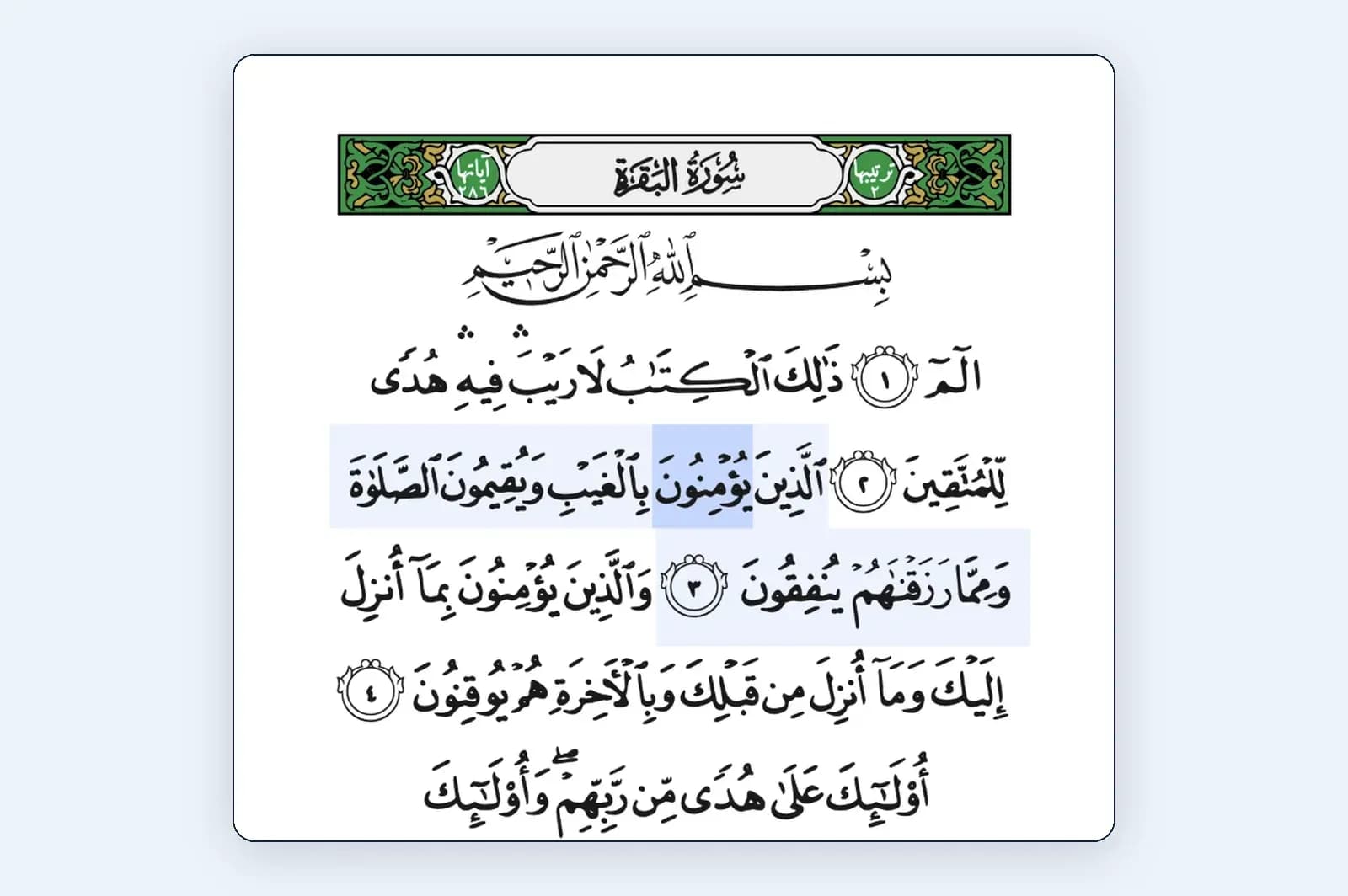
You can read the Quran's Arabic online by opening Qiraa's surah directory in your browser and choosing a chapter. The public reading pages display the text without requiring an app download or a sign-in. Begin with a clear task: open the chapter you want, confirm its name and number, and decide where your reading will end. A browser session can be useful on a phone, tablet or computer when you want to reach a passage through a simple link.
Choose the chapter from the directory
Use the directory to choose the chapter rather than guessing its web address. The entries identify chapters by number and by Arabic and transliterated names. For a short navigation exercise, open Al-Fatihah or Al-Ikhlas. Check the heading before continuing. The address spelling may be simpler than the name you see on the page, so a different transliteration in a note does not mean you need to invent another URL. Keep the address from the chapter you actually opened.
Separate a chapter number from a verse number when you arrive with a reference. In 2:255, the 2 identifies Al-Baqarah and 255 identifies the ayah within it. It is not page 255 or the 255th line on your screen. Open Al-Baqarah's reading page and keep that reference beside you. The longer the chapter, the more useful it is to know the exact destination before scrolling. If reference notation is new, the guide to reading Quran verse references provides a separate introduction.
Understand where a verse link lands
A direct verse link can shorten the search. The Al-Baqarah 2:255 link targets that ayah's ending marker on the page. The marker is at the end of the verse, so scroll upward to find its beginning before reading through it. Treat the number as a way to locate and confirm your place. If a browser positions the page differently while it loads, check the visible verse marker again rather than assuming that the first word on screen must be the first word of your chosen ayah.
Choose a small reading boundary before you begin. You might read a chapter you know, revisit a teacher's assigned range, or open one reference mentioned in a book. Write the start and end references in a note, then read the passage with the neighbouring words in view. A screenshot of an isolated line can lose the reference and surroundings that make it easy to check. Keeping the reading page open gives you a place to return when a question concerns what came immediately before or after.
Save a bookmark and a clear place note
Save the chapter's direct address using your browser's bookmark function. Give the bookmark a title that will still make sense next week, such as the chapter name and the reference you want to revisit. You can also save a verse link containing the ending-marker fragment, as in the example above. When returning to it, use the same check: identify the ending marker, then locate the verse's beginning. A bookmark opens an address; it does not by itself record which words you have read or what your next task should be.
Keep a short session note beside the bookmark. Record the last reference you completed, the next one you intend to read, and any question to bring to a teacher. Distinguish 'I stopped after this ayah' from 'I want to begin at this ayah'. That small wording choice prevents a bookmark from becoming an ambiguous stopping point. When someone sends you a reading task, ask for the chapter and ayah range as well as the link, so you can confirm the task even if the screen opens at an unexpected position.
Make the browser view comfortable
On a small screen, use the browser's page-zoom controls where available to find a comfortable view. Change one setting, then check a complete line and its verse marker before continuing. You may find it easier to rotate the device or use a larger screen for a longer session. These are browser and device choices; choose the view in which you can distinguish the text without repeatedly losing your line. Your screen size or zoom level changes how much fits in front of you, so retain the verse reference as your main place note.
If the Arabic appears blank, as boxes, or as shapes you cannot read, pause and let the page finish loading, then reload if necessary. Try opening the same direct chapter address in another up-to-date browser to see whether the display issue persists. Do not guess letters from a broken display. For a more systematic reading check, see Quran reading accessibility: text size, zoom and fonts. Keep a sample reference in your note so that you can describe exactly which page or line is causing difficulty.
Choose app practice when you need that task
Choose the companion app when your task calls for its documented practice tools. Qiraa's official explanation describes listening with repetition and using Listen, Repeat and Test for memorization. The listening screen illustrated above belongs to that app experience. On the public chapter pages, the listening and practice links lead toward downloading the app; use the browser's reading area for the web task described here. Decide what you want to do next before following a practice link, so opening a passage stays a simple reading session when that is all you need.
Try the short sequence below with a passage you already intended to read. The aim is to make your next visit easy: the right chapter, a reference you can verify, and a clear note about where to continue. If you are reading with another person, send the direct reading link and the reference in plain text together. Ask them to confirm the chapter heading and verse number before discussing a particular line. This makes the shared passage easier to identify even when you are using different screen sizes.
Keep reading and meaning questions traceable
- Open the directory and select the intended chapter.
- Confirm the chapter heading and the exact ayah reference.
- If using a verse link, find the verse beginning above its ending marker.
- Choose a readable view and read the portion you planned.
- Save the direct address and note the next reference separately.
Use the page's explanatory material according to what it supplies. The chapter pages include English summaries and section descriptions; these serve a different purpose from a complete verse-by-verse translation. For a meaning question, note the exact reference and the named translation or tafsir you consult, then return to the surrounding Arabic passage. You can keep browser reading simple while making your questions precise. End the session with a bookmark and a next reference you understand, ready to reopen the reading rather than search for it all over again.


Responses
A thoughtful conversation starts with care. Responses are reviewed before they appear.
Loading the conversation…